Pope Tech release notes for 2026.
Want to know what has been updated recently at Pope Tech? You are in the right place. These release notes include all updates, including small updates and bug fixes.
The Release Notes include updates for both Pope Tech products, the Web Accessibility Platform (scan websites) and Canvas Accessibility Dashboard (scan courses).
Any questions or feedback, don’t hesitate to contact us.
Sep 18th Release Notes
Canvas Accessibility Dashboard Updates
Update includes a very popular feedback request to support tagging along with other improvements.
Course and Sub Account Tagging
Tagging courses and sub accounts gives you another way to organize and filter accessibility data. Tags can be added to sub accounts and courses from the Admin Settings view. Each sub account and course can have up to five tags at a time.
For example you could tag courses/sub accounts as key courses, different comparison samples or tag which sub accounts are department level sub accounts for reporting.
Once you’ve added tags to sub accounts or courses, you can filter your dashboard data by those tags or run reports by tag. There is now a tag filter on the Admin dashboard and Report Views.
Compare changes for courses and sub accounts within a date range
Filtering courses’ scan details by accessibility changes means you can quickly see which courses have improved the most and which have had the most regressions.
From the Admin Dashboard, navigate to the scan details list and set up filters using the following steps:
- Select Admin then the account in the Global Navigation.
- Select Pope Tech Accessibility from the Course Navigation Menu.
- Scroll down to the Courses widget.
- Select View All. You’re now on the full Courses list.
- Select Filters.
- Adjust the Start Date and End Date. Leave the end date blank to default to today’s date.
- In the Scan Details list, select Sort By delta.
- Select Submit.
Now the deltas, or changes, for each data point show next to the current total, and when you select a column header, it’ll sort the data by the delta.
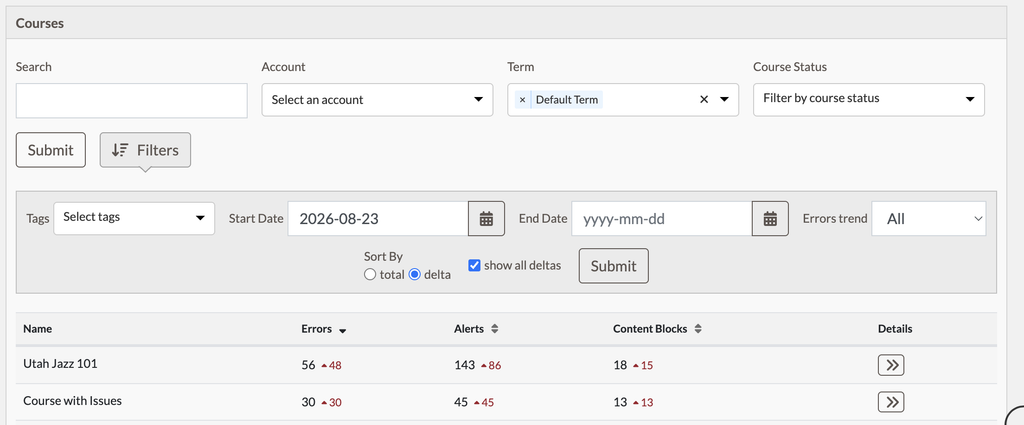
You can use the Errors trend drop-down to find scans where the trend increased (there were more errors or regressions) or decreased (the data point improved).
Other Canvas Accessibility Dashboard Updates
- Added tag and delta support throughout different report options.
- Moved filters in Admin Dashboard to collapsed “Filters” dropdown.
- Added Sub-Accounts tab into Admin Settings.
- Fixed issue in Accessibility Guide with improper labels on heading selection dropdowns.
Web Accessibility Platform Updates
- On Website edit moved “Website Owners” into new section called, “Details”.
- Added new field called, “Platform” in details section.
- If Shopify is selected added the ability to add headers that pass on scan that can be configured in Shopify settings. Useful if Pope Tech scans are being blocked by Shopify.
- Added category column to page_results.csv (Errror, Alert, etc).
- Fixed expected format in API documentation for reports.
PDF Scanning Updates for Web and Canvas
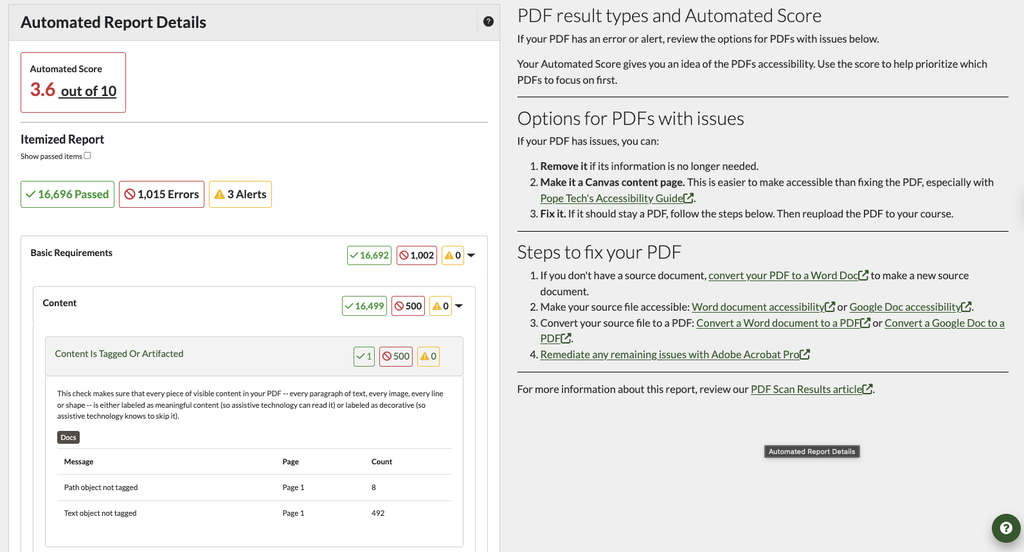
- Defaulted PDF Detail view to only showing failed checks unless “Show All checks” is checked.
- Improved result level granularity including Message, Pages found on and count.
- Added result level documentation activated by, “Docs” button.
- Improved PDF scanning for some documents that weren’t previously scanning.
August 17th Release Notes – Canvas Accessibility Dashboard Update
- Fixed issue with Accessibility Column on courses and pages not always loading.
- Improved flow for course syncs to limit syncs blocking other syncs.
- General infrastructure improvements for Canvas scans, syncs and document scans.
August 11th Release Notes – Web Accessibility Platform Update
- Fixed issue with scan transparency not showing number of scans ahead in queue outside of users group.
August 5th Release Notes
- Updated Video Result icons for consistency
July 22nd Release Notes
- Updated the Result Detail and Page Detail CSV report options to export the results as a single CSV file. The summary and template csv files are still separate inside of the zip file. This is based on user feedback for easier review of results.
July 17th Release Notes
- Added prioritization for scans with scans triggered by users getting a higher priority in an organization’s queue than scheduled scans. Only affects large accounts.
- Added scan queue status on scan and website views to increase transparency to end users when they are in a sub group that doesn’t have access to all of the scans in the organization.
- Fixed issue when running a crawl test where the sample of pages found was incorrectly empty.
July 10th Release Notes
Updated WAVE engine to handle tabindex=-1 on linked images correctly.
Web Accessibility Platform Updates
- Improved Crawl when robots.txt url is an html page to handle it correctly and revert to traditional link crawl.
- Fixed edge case where external sites were being added from sub-domain crawl
Canvas Accessibility Dashboard Updates
- Fixed issue in Accessibility Guide where Remove ARIA button wasn’t working.
- Improved headings helper text in Accessibility Guide.
- Fixed issue where Course dismiss sometimes caused the wrong total in Accessibility Guide.
- Added handling for special characters in course name for Accessibility Column on courses view.
- Added Alternative Formats functionality to Modules view, Discussion Page, and Announcements List for students. Announcements List support requires an update to JS in Canvas theme.
- Improved syncing of Canvas hosted PDFs to prevent generic document results.
July 3rd Release Notes – Canvas Accessibility Dashboard Updates
- Fixed issue where some some canvas account reports are failing.
- Improved Guide Error for dismissing results to clarify to rescan in the Dashboard.
- Updated to remove PDFs no longer found on future course scans.
- Fixed issue where Course code can be too long.
- Fixed issue with filters in reports view.
- Fixed issue where some links to documents in canvas files were not being detected (preview links).
June 29th Release Notes
Web Accessibility Platform Updates
Update included a very popular feedback request to support tagging along with other improvements.
Website and Group Tagging
Tagging websites and groups gives you another way to organize and filter website data. Tags can be added to groups and websites when creating them or editing them. Each group and website can have up to five tags at a time.
For example you could tag websites/groups as production vs stage, by CMS, server, or tag which groups are department level groups for reporting.
Once you’ve added tags to groups or websites, you can filter your dashboard data by those tags.
- Select Dashboard in the left main menu.
- Select Filters in the top right.
- Select the tag from the drop-down or begin typing it to narrow the selection.
- Select Update.
Your data is now filtered for any websites or groups with that tag. The View All option for the Scan Details and Errors by Group widgets on the dashboard can be filtered by tags. You can also filter the Websites and Manual Tests views by Tags.
In addition to seeing tag fields when editing and adding groups and websites, tags also show up in these areas:
- Mass website import. You can mass-import websites and complete the tag column as part of your CSV.
- CSV summary report. The CSV summary report has a new column listing all the tags.
- Bulk edit websites. When you bulk edit websites, there’s the option to add tags to multiple websites at once.
Compare changes for websites and groups within a date range
Filtering websites’ scan details by accessibility changes means you can quickly see which websites have improved the most and which have had the most regressions.
Navigate to the scan details list and set up filters using the following steps:
- Select Dashboard in the left main menu.
- Scroll down to the Scan Details widget.
- Select View All. You’re now on the full scan details list.
- Select Filters in the top right.
- Adjust the Start Date and End Date. Leave the end date blank to default to today’s date.
- Select Update.
- In the Scan Details list, select Sort By delta.
- Select Update.
Now the deltas, or changes, for each data point show next to the current total, and when you select a column header, it’ll sort the data by the delta.
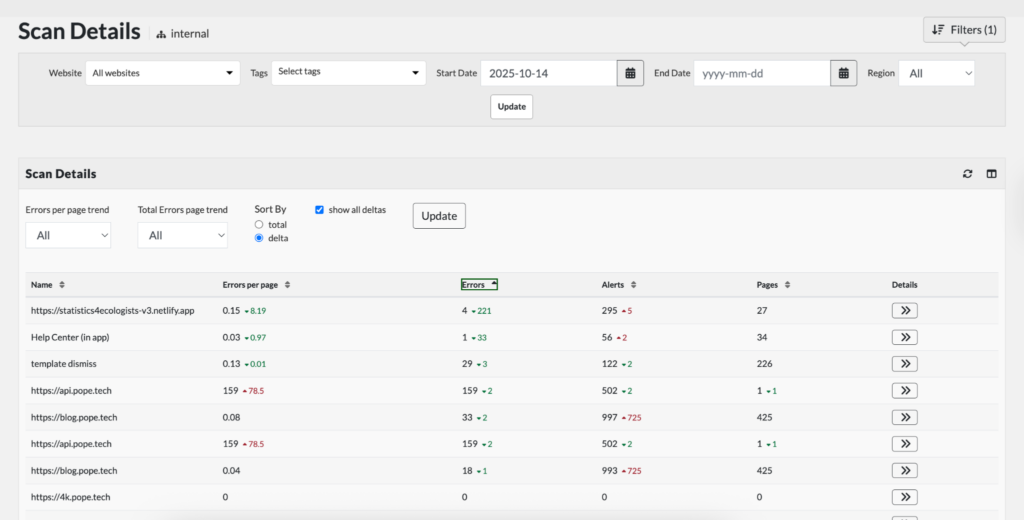
You can use the Errors per page trend and Total Error page trend drop-downs to find scans where the trend increased (there were more errors or regressions) or decreased (the data point improved).
Select the column headers to sort by a decrease or an increase in that data point. For example, to find websites that have improved their errors, you’d select the Errors or Errors per page column header to sort by increasing and decreasing changes.
Select the column selector in the top right to adjust what data points are in the scan details table.
Other updates
- Filters on Dashboard now collapse into a filters dropdown to simplify the UI with additional filter options.
- Scan Details widget defaults to showing the change in the last 30 days for each website errors/page which can be updated in the filters.
- Errors by Group widget defaults to showing the change in the last 30 days for each groups errors/page which can be updated in the filters.
- Add tag column in website CSV import.
- Added tag column in csv summary report.
PDF Scanning updates
- For PDF Scanning updated User Agent when downloading PDFS to use the Pope Tech Scanbot User Agent.
- Allow users to reset inactive documents so they are attempted next scan
Small Bug fixes and improvements
- Fixed contrast errors in 3rd party api documentation.
- Updated scan started timestamp to match the other timestamps.
- Fixed issue with duplicate template versions when using regions and templates.
- Fixed issued with scorecard in scan details failing to load when sorting by template.
- Fixed issue with crawls not starting where start page has <meta http-equiv=”Refresh” content=”0; URL=” />
- Fixed issue where page reloads after dismissing results losing pagination context.
- Small UI and flow improvements.
Canvas Accessibility Dashboard Updates
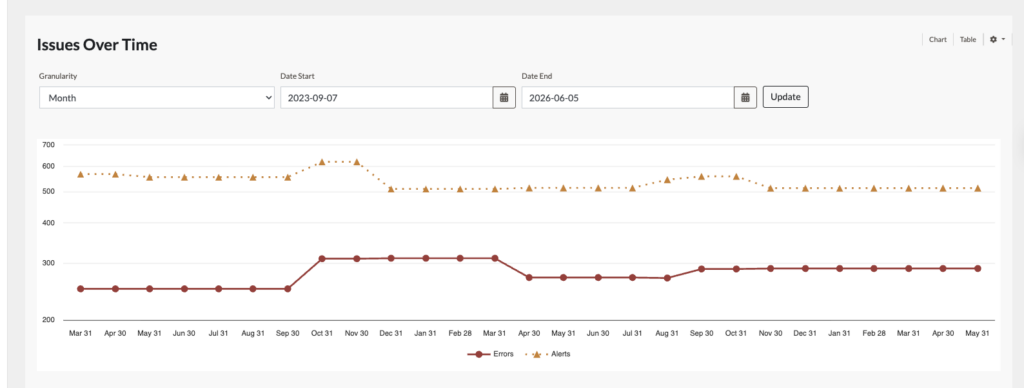
- Added Issues overtime Graph at the bottom of the course dashboard
- Fixed pagination issues on reports and scheduled reports
- Fixed issue in Admin dashboard where Issues by account widget wasn’t being updated properly with filters.
- For PDF Scanning updated User Agent when downloading PDFS to use the Pope Tech Scanbot User Agent.
- Added a new navigation item in the Admin Dashboard called, “Scans” to see the status of all scans running or queued.
April 25th Release Notes – Web Accessibility Platform
Updates to PDF Scanning.
- Added new document scanning status of “Downloading” when the scanner is downloading the documents to scan. This gives more transparency to the document scanning process.
- Fixed issue with documents tab not showing for accounts without templates turned on.
- Fixed issue where document scans were not finishing or getting stuck with a status of “creating”.
April 20th Release Notes
This update includes many updates based on user feedback along with many improvements and bug fixes.
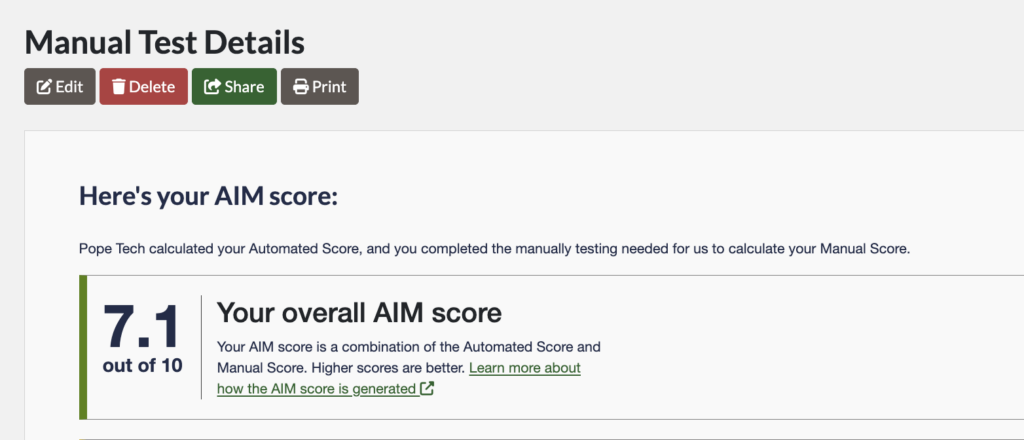
Web Accessibility Platform – Exportable AIM Score report and Accessibility Progress Report
You can now easily share your AIM Score and Accessibility Progress Reports with anyone through a public link, email, or print option.
After finishing your AIM Score or Accessibility Progress Report, select Share or Print. In the Share option, you can generate a public link, send the public link to anyone, edit the email text, and revoke access to the public link at any point.
Other Web Accessibility Platform Updates
- Added YouTube detection for videos embedded via the oEmbed protocol.
- Added additional filters to the Users view. Training seat, Assigned Group, Two-Factor Authentication, Status.
- Updated delete page flow to only delete the page and not change past scan values.
- Added URLs for drawer states. For example, when you open a Help Center article in the app, there is now a unique URL for that article when opened in a drawer state that can be shared or navigated to using the browser back button.
- Improved user field when editing report options on a scheduled scan. Users won’t see other users who aren’t in their sub-group, but can see how many other users receive the report outside of their sub-group.
- Updated Inspect view with recent WAVE UI updates including the Automated Score.
- Added Document Scan section on scan view to see document scan progress.
This update included numerous smaller bug fixes and improvements:
- Fixed an issue on some scheduled scans when editing a scheduled scan and the website field or user field would appear blank.
- Improved loading speed of Pages widget on large websites and scan view for large # of scans.
- Improved error messaging when unable to add a page manually because a crawl is running.
- Improved form accessibility on some forms where instructions weren’t tied to input controls.
- Fixed issue where error results weren’t sorting properly when viewing a past scan with a content region filter.
- Improved focus indicator in Start Scan/Crawl widget.
- Fixed issue where Professional Plan accounts couldn’t sort by “Last Seen” column when viewing users.
- Made it so the permissions in the Owner Role can’t be edited.
- Fixed issues with dismissing results when using Inspect in the Details view.
- Updated all result icons to go to Result Documentation articles instead of legacy tip drawers.
- Fixed issue where results weren’t loading when drilled into a specific results type and filtered by the Template region.
- Improved accessibility of Drawers such as Inspect and Result Documentation to follow the Dialog ARIA Pattern.
- Removed disabled/inactive buttons on scheduled scans, pagination, website list and edit views and added Error messaging improving accessibility and decreasing potential confusion.
- Fixed issue where Scan Detail scan error difference was not including Contrast Errors.
Canvas Accessibility Dashboard Updates – Copied dismissed results to new course
Added functionality so that copied courses automatically bring over the dismissed results from the old course. This makes it easier for faculty who have already reviewed a course and dismissed the results to not have to re-review copied content in the new course.
Other Canvas Accessibility Dashboard Updates
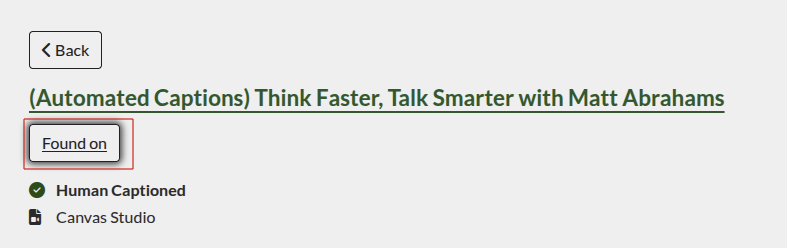
- Added Video Detail view.
- Added ability to see other courses a video is found on via the Video Detail view.
- Split Canvas scanning queue into 2. Priority scans and Low priority scans. Priority scans include live events and course rescan triggered in the Course Dashboard. Goal is to decrease time when users are waiting for scans vs automatic scans in the background.
This update included numerous smaller bug fixes and improvements:
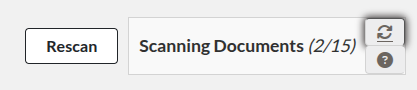
- Added scan status for Documents in Course Dashboard to see progress.
- Fixed issue with View Scan Details link not showing for some PDF Scanning results.
- Improved accessible name for link in the Course Widget on Admin Dashboard.
- Improved the Documents table by removing Details button for scanned PDFs that returned a 403 or 404 error, or weren’t found, so they weren’t scanned and have no Details to view.
- Fixed issue where result counts on Admin and My Dashboard weren’t matching when drilling into Dashboard widgets.
- Fixed isolated issue where Documents tab wasn’t loading.
- Updated most common issues widget to not include dismissed results in the ranking.
- Fixed issue where No heading structure results weren’t dismissing in assignment content types.
- Improved keyboard accessibility in the Accessibility Guide.
- Updated text of comparison language on email reports when the report date is changed.
- Fixed issue with Groups widget where error density was double counting Contrast Errors.
- Improved handling of Canvas Studio video urls that was causing some videos to detect Canvas Studio captions.
- Fixed issue where you sometimes couldn’t dismiss Link to Canvas Assets in the Accessibility Guide.
- Improved accessibility of Drawers such as Result Documentation to follow the Dialog ARIA Pattern.
March 10th Release Notes
This update includes accessibility improvements, feature updates, and bug fixes. The Canvas Accessibility Dashboards include a major feature release, BeeLine Reader.
Web Accessibility Platform Updates
- Fixed issues with Scan Results widget double-loading when adjusting filters.
- Improved messaging and table updates when bulk editing Scheduled Scans.
- Fixed missing template filter.
- Improved accessibility on Dashboard widgets and data tables.
- Improved form accessibility.
- Improved keyboard accessibility of the Group Hierarchy widget.
- Added a new alert result that detects oEmbed resources.
- Fixed issue with Jira integration breaking often.
- Updated link-related result details so the link text field shows the link’s text instead of the URL.
Canvas Accessibility Dashboard Updates
BeeLine Reader
BeeLine Reader, an award-winning readability tool, is now available to Canvas Accessibility Dashboard users.
BeeLine’s readability feature uses color gradients to help students and faculty read more easily. This helps readers of all ability levels, but is especially helpful for readers with disabilities like dyslexia, ADHD, or visual impairments.
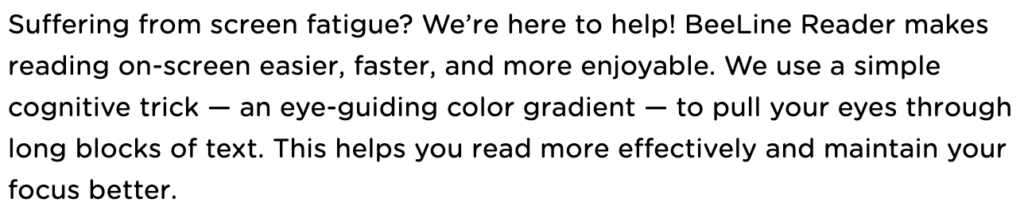
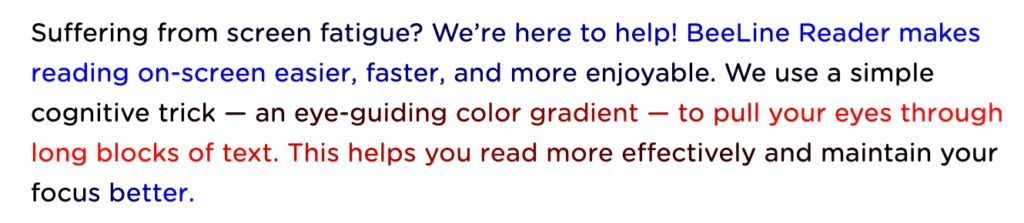
This feature is included in all existing Pope Tech Canvas Accessibility customers’ plans. Give BeeLine Reader a try and learn more in our Pope Tech and BeeLine Reader Partnership Announcement.
Other Canvas Accessibility Dashboard updates
- Made sure contrast tools appear in all content blocks with a contrast error.
- Improved the process of deleting a dismissed result, so filters and view stays active after deleting.
- Fixed an isolated issue where courses with over 191 characters couldn’t be enabled.
- Added Link to Canvas Asset documentation in Accessibility Guide.
- Improved focus border of the result in the Canvas editor when it’s selected in the Accessibility Guide.
- Improved error messaging for PDF scanning when the PDF link returns a 404 or 403 error.
- Improved screen reader accessibility and keyboard functionality in dashboard widgets.
- Improved Last Scan progress indicator on Course Dashboard to show PDF Scanning status when the course is scanning.
- Fixed button styling issue for an active tab when viewing documentation in the Accessibility Guide.
- Increased alternative formats icon size.
- Updated link-related result details so the link text fields show the link’s text instead of the URL.
- Added a new alert result that detects oEmbed resources. oEmbed resources that link to YouTube videos are automatically converted to a YouTube result type.
February 24th Release Notes
Minor bug fixes and updates.
Web Accessibility Platform Updates
- Improved error messaging for crawls that fail due to SSL configuration.
- Fixed issue with certain sites getting 403 errors when trying to crawl.
February 19th Release Notes
Two major features were announced.
PDF Scanning for Canvas and Web
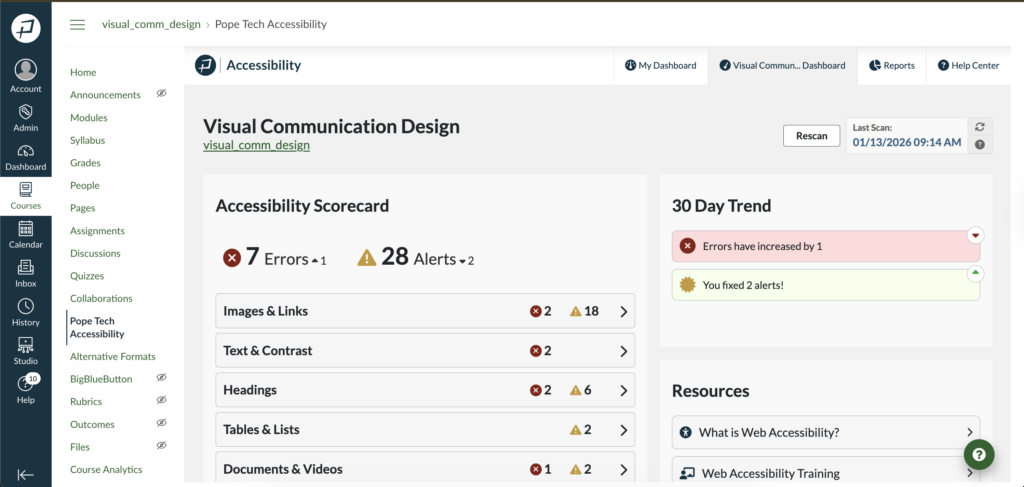
Both Canvas Accessibility Dashboards and the Web Accessibility Platform now have PDF Scanning. This means you can scan PDFs for issues directly in your Pope Tech tool. PDF Scanning is in beta and is available as an add-on. Contact your account representative or support for pricing details.
For more information on this new feature, check out:
- Web Product Updates
- Web PDF Scan Results Documentation
- Canvas Product Updates
- Canvas Scan Results Documentation
Updated Canvas Course Dashboard
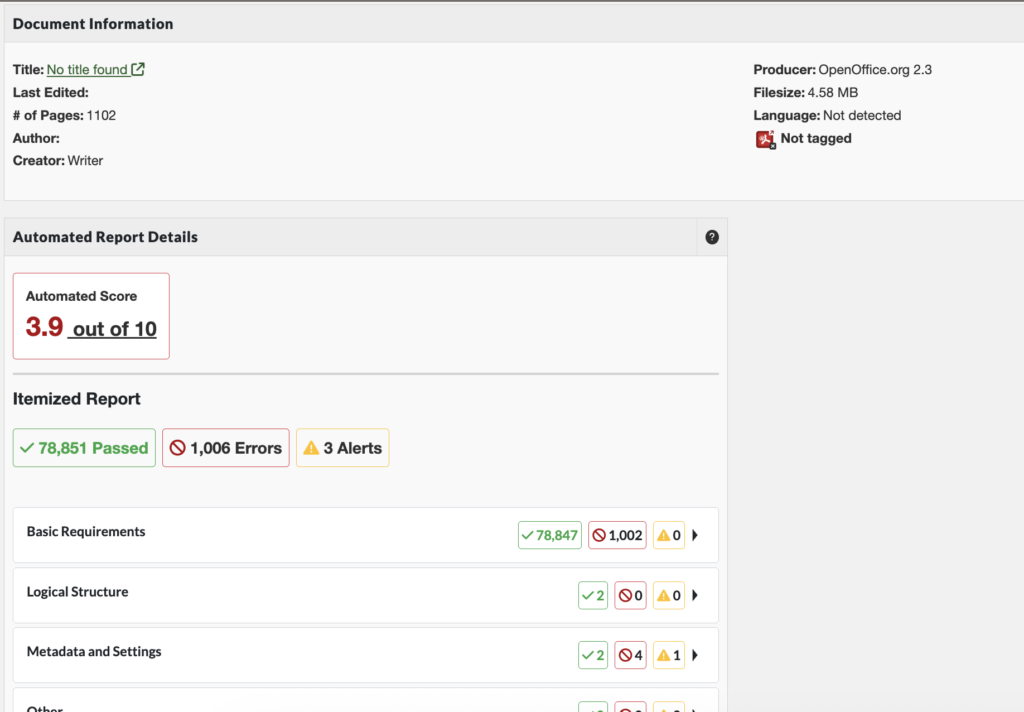
The updated Course Dashboard includes three new widgets and a Documents and Videos dashboard.
The three new widgets are:
- Accessibility Scorecard: Shows how many errors and alerts are in each category. Can drill into just those issues.
- 30 Day Trend: Shows how errors and alerts have increased or decreased.
- Resources: Gives three resources beginners can use to orient them to accessibility.
The Documents and Videos Dashboard is accessed from the Accessibility Scorecard and organizes all Document and Video results in one place.
The new course dashboard is currently opt-in only. To opt-in, contact your account representative.
Learn more at Canvas Product Updates.
February 12th Release Notes
Minor updates and bug fixes.
Web Accessibility Platform Updates
- Improved the algorithm for matching HTML results, which makes codeview, result dismissal, and region matching more reliable.
- Fixed filtering throughout the product so results update to when new filters are set.
- Gave search labels unique names when multiple search fields are on a page.
- The website name in the Result Details list now links back to the Website’s edit page.
- Fixed issue where the User list wasn’t sorting correctly when sorting by the Last Seen column.
Canvas Accessibility Dashboard Updates
- Improved screen reader support when the user opens help documentation from the Accessibility Guide.
- Fixed the relative document link in result details for internal file documents to be an absolute URL to the document’s location.
- Updated Canvas scanner, so it still scans content blocks even with a misconfigured Canvas Studio setup.
- Fixed it so course reports show the most common error as Contrast Error if that is the only common error.
- Improved heading accessibility in Accessibility Guide.
January 31st Release Notes
Includes minor updates and bug fixes.
Web Accessibility Platform Updates
Scan Time to Live (TTL) Feature
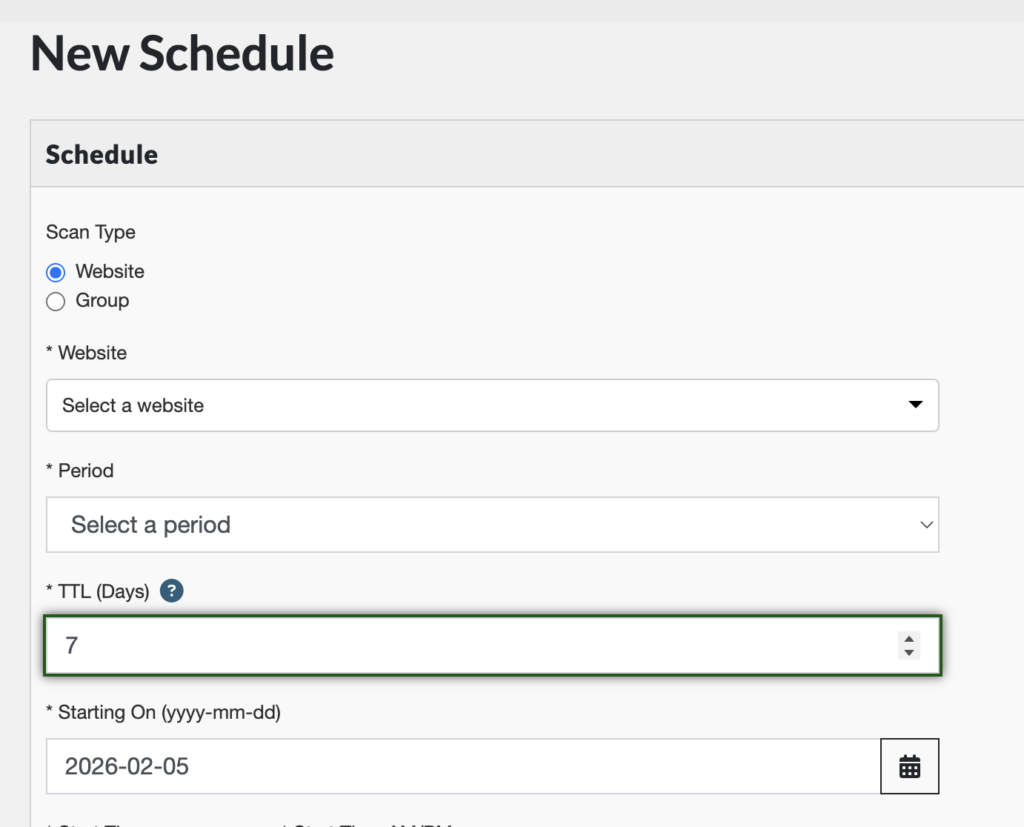
Added a new field to schedule scan options. The TTL (Days) field determines whether or not the scheduled scan uses an existing scan or starts a new one.
For example, if your TTL is set to 7 days, the scheduled scan will re-use the scan data from a scan completed within the past 7 days.
This helps limit unnecessary scans, improving scan times.
Other Web Accessibility Platform Updates
- Added last scanned date to CSV reports.
- Fixed issues when mass-importing users.
Canvas Accessibility Dashboard Updates
- Fixed issue where Accessibility Guide wasn’t detecting Canvas Studio videos.
- Fixed issue where the course’s dismissed results list was populated with dismissed results not related to the course.
- Removed unnecessary links in the Result Detail HTML report.
- Fixed links in Result Details to go to available Result Documentation.
- Fixed issue where dismissed Kaltura and HTML5 results from the Accessibility Guide weren’t dismissing in the Dashboard.
- Fixed conversion discrepancies with the Alternative Formats tool.
- Improved error messages when inputs are missing for the Alternative Formats tool.
- Added the Alternative Formats icon back to all page views.
- Made responsive improvements to the Accessibility Column on the courses’ pages list.
- Resolved contrast error discrepancies between the Dashboard and the Accessibility Guide.
January 23rd Release Notes
This update includes minor bug fixes.
Web Accessibility Platform Updates
- Improved process for bulk editing scan redirect filters, and fixed issue where bulk edits weren’t working.
- Fixed an issue where the user field for the person who dismissed a result wasn’t showing.
- Resolved issue with AIM score where completed questions were marked as incomplete in certain scenarios.
- Added a “Pages without errors” column to Summary CSV reports.
- Fixed the mass website importing process so that the group field is no longer required. Websites with no group are added to the account’s root group.
- Fixed issue where certain results weren’t dismissing in Inspect view.
January 13th Release Notes
Web Accessibility Platform Updates
- Updated crawler to fix issues with certain SSL configurations.
- Added the ability to edit SSO users even if SSO is turned off for the organization or if the user is part of two organizations and one requires SSO.
Canvas Accessibility Dashboard Updates
New Detail View in Canvas Dashboards
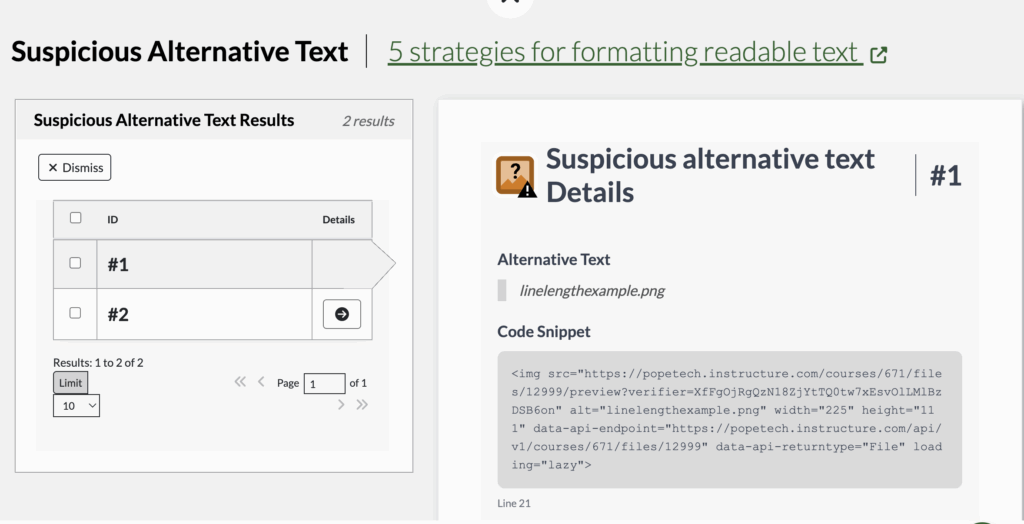
Accessibility results now have a detail view that give information specific to that result type if applicable, the code snippet, and documentation.
For example, a Suspicious alternative text detail view shows the Alternative text, code snippet, and documentation.
Other Canvas updates
- Captions on YouTube videos added through Canvas Studio are now detected.
For additional recent updates, view Release Notes – 2025.