
Pope Tech has two accessibility tools to use with Canvas:
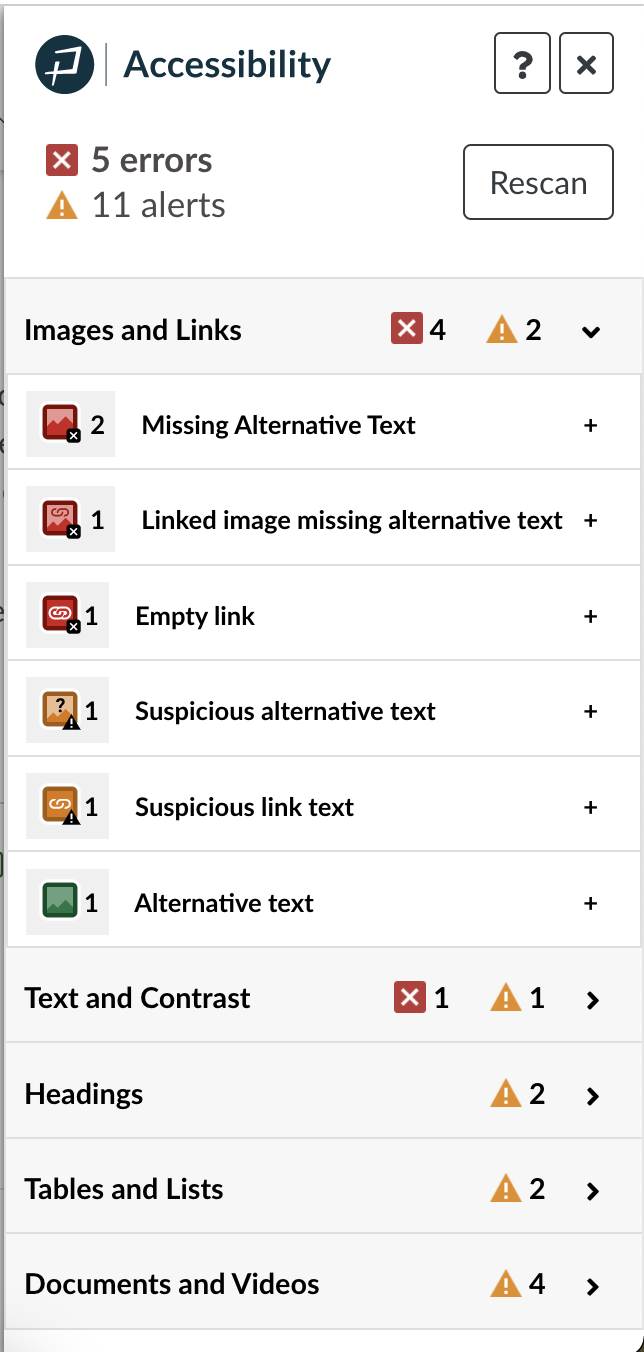
First, the Accessibility Guide, which is used right in the Canvas course editor.
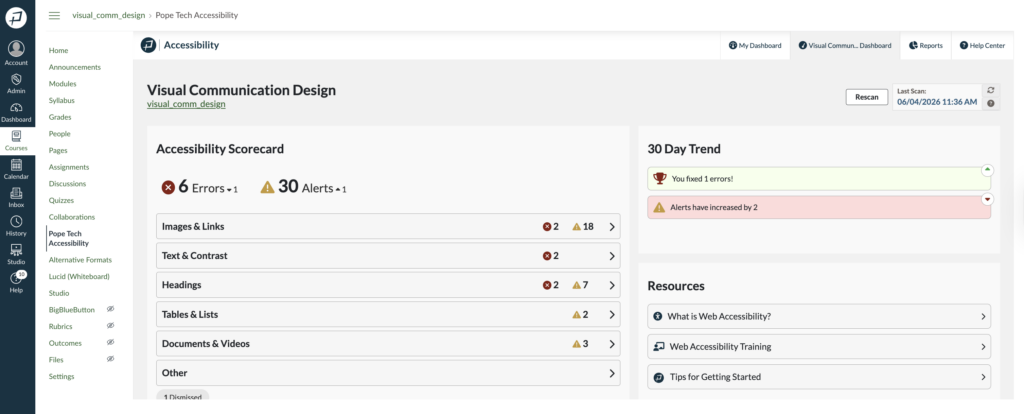
The second tool is the Accessibility Dashboards, which help instructors and admins understand their current accessibility state, prioritize work, and track progress.
Below are help videos and articles for:
Accessibility Guide
Just starting with the Accessibility Guide? Watch the videos or review the article below.

Access and Navigate the Accessibility Guide (YouTube Video)
How to use the Accessibility Guide when editing a course page.
Accessibility Guide Demos YouTube Video Playlist
Demos for low contrast, skipped heading levels, layout table, suspicious link text, and missing alternative text issues.

Get started with the Canvas Accessibility Guide
How to access and navigate the Accessibility Guide. You’ll also learn how to fix common errors.
How to create accessible Canvas courses article
How to create accessible course content from the start.
Instructor dashboards
Instructor dashboards include a Course Dashboard and My Dashboard. The Course Dashboard has all your accessibility data for one course. The My Dashboard has all the accessibility data for all your courses in that term.
Use the videos and article below to learn how to navigate the data and determine where to start.
Get Started using Canvas Course Dashboard (YouTube Video)
How to navigate and use the data to know where to start fixing issues in your course.
Canvas My Dashboard and Reports (YouTube Video)
How to use the widgets on Pope Tech’s Canvas Accessibility My Dashboard to review all your courses’ accessibility.
Canvas Accessibility Instructor Dashboards
How to access and use both Instructor dashboards.
Canvas Dashboard Course Scanning
How to view your course’s scan status, when it was last scanned, and how to manually rescan the course.
Reports
Export and email reports
Learn how to create and email reports for courses and accounts.
Report formats and types
Learn what each report format and type looks like.
Admin dashboards and settings
Canvas Accessibility Admin Dashboard
How to access the Admin dashboard and use each widget.
Admin Settings
How to navigate to settings, enable courses, and fix syncing issues.
Canvas Studio video tracking in Pope Tech
How to connect Canvas Studio to track Canvas Studio captions.
Canvas Installation Instructions
Learn how to install the Accessibility Guide to your Canvas instance.
Dismiss results in Canvas
Dismiss results
Learn how to dismiss and manage dismissed results.
PDF Scanning
PDF Scan Results
Learn how to access and use PDF scan results.
Alternative Formats and BeeLine Reader in Canvas
Alternative Formats in your Canvas Course
How to convert documents and content to other document types.
BeeLine Reader in your Canvas Course
How to set up and use BeeLine Reader.
Pope Tech Canvas updates
Sign up to get product updates. Unsubscribe at any time.
Want to learn more about Pope Tech’s Canvas accessibility tools?
Learn more about Canvas Accessibility Guide and Dashboard features